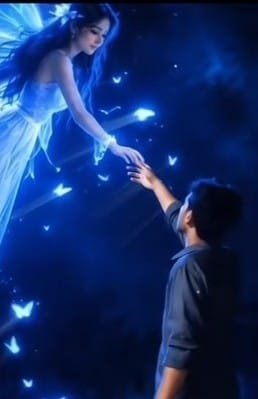
AI can now turn a simple photo into a beautiful fantasy video. A normal photo can be changed into a scene where a magical fairy flies toward the person from the sky. Trending Flying Fairy AI Video Prompt is made for creating this kind of interesting video. In this video, the person stays in the scene while a glowing fairy slowly flies toward them from a distance.
The fairy does not walk on the ground. She stays in the air and moves forward with a smooth flying motion. Blue light, soft fog, glowing particles, dark surroundings, and cinematic camera movement can make the whole scene look magical. The best part is that you do not need to create everything yourself. With one good photo and a suitable Prompt, AI can create a fantasy-style video from it. If you like making new and creative AI videos, this idea can give your photo a completely different look.
Trending Flying Fairy AI Video Prompt
Flying Fairy AI Video Editing Prompt can turn a simple photo into a fantasy-style video. The main attraction is the fairy flying through the air with beautiful blue magical light around her. The person in the photo can stay naturally in the scene while the fairy slowly comes from far away. She should not walk on the ground.
Instead, she should fly and move through the air toward the person. Her hair and dress can move naturally with the wind while small glowing particles follow her. When using an AI Fairy Video Prompt, it is important to clearly describe the movement. If you only write fairy, AI may sometimes make the fairy stand or walk on the ground. So, it is better to clearly mention that she must fly from the sky and remain above the ground during the scene.
AI Prompt Guide For A Flying Fantasy Scene
First, choose a clear photo where the person’s body and clothes can be seen properly. Then use this photo for creating the AI video. After adding the photo, use the Prompt given in this post.
The Prompt should clearly tell the AI to keep the person’s face, clothes, and identity unchanged.
Next, clearly describe the fairy’s movement in the Prompt. Mention that the fairy should fly from the distant sky, should not walk on the ground, and should stay floating in the air. You can also tell the AI to make her hair and dress move naturally while she comes closer.
For the video environment, you can add details such as a dark forest, blue magical light, soft fog, glowing particles, and cinematic camera movement. Finally, mention the video format, such as vertical 9:16, realistic movement, and cinematic look. This can help the AI understand the type of video you want to create.
How To Create This Effect With AI Fairy Video Prompt
- First, open Google on your mobile and search for Flow AI. Open the website that appears in the search results.
- After the website opens, sign in with your Gmail account. Then click the Plus icon and add the photo you want to use.
- After adding the photo, go to the Text option and paste the Trending Flying Fairy AI Video Prompt given in this post.
- Before generating the video, check that the Prompt clearly says to keep the person’s face, clothes, and identity the same.
- You can also choose the video Ratio or Size according to your needs. For Reels or Shorts, you can use the Vertical 9:16 format.
- After everything is ready, click Generate and wait for a while. AI will create the video according to your instructions. When the video is ready, watch it carefully.
- If you want a different result, you can change some parts of the Prompt and generate the video again. Most importantly, check whether the fairy is flying toward the person from the sky instead of walking toward them.
IMAGE GENERATE PROMPT
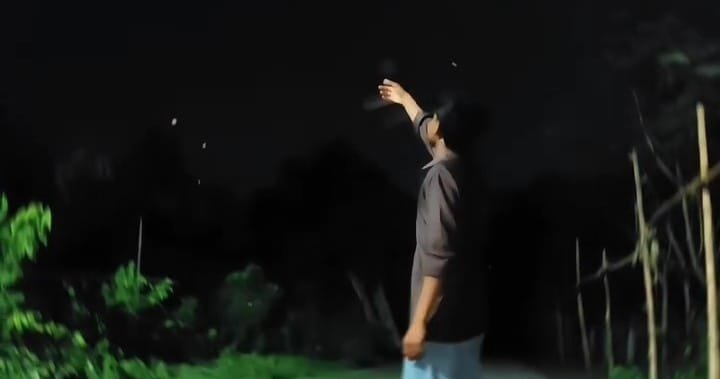
Use the uploaded image as the exact reference. Keep the boy, his face, pose, hand position, clothes, background, lighting, and camera angle unchanged.
At the exact place where the boy has raised his hand, add a beautiful fairy-like girl glowing with bright blue light. She should appear to be flying gently in the air and moving toward the boy. She is looking at the boy while reaching out and holding his raised hand. Make her look magical, bright, realistic, and naturally blended into the scene, with soft blue glowing particles around her body.
VIDEO GENERATE PROMPT
Use the uploaded image as the exact reference. Keep the boy, face direction, pose, white shirt, raised hand, background trees, night setting, lighting, colors, composition, and camera angle exactly the same. Do not change his face, clothes, background, or any other details. Do not add extra objects or a watermark.

Action: A beautiful girl who looks like a glowing blue fairy appears a short distance in front of the boy. She slowly flies toward him in a straight line while looking at him. She gently reaches out her hand and holds the boy’s raised hand. The boy slowly pulls her closer while holding her hand. She naturally comes closer and softly lands on the ground in front of him while looking at him. Her movement should be smooth, magical, and realistic, with soft blue glowing particles and light around her body.
Turn One Photo Into A Magical Night
The most interesting part of an AI video is when a simple photo becomes part of a complete story. In this type of AI video, the person is not simply standing in a normal place. A fantasy environment is created around them. A dark night, trees, soft fog, and blue magical light can make the scene look completely different.
When the fairy slowly flies toward the person from far away, the video can feel like a small story. At first, the fairy can appear very small in the distance. Then she can gradually come closer while flying through the air. Blue light and small glowing particles around her can make the movement look more beautiful. When the person slowly reaches a hand toward the fairy, the scene can feel more natural and interesting.
While creating this type of video, it is better not to add too many effects at the same time. Simple movement and a clear Prompt can often give a more natural result. So, try to match the environment, lighting, and fairy movement properly with your photo.
A Little Magic Can Change The Whole Scene
One of the most fun things about creating fantasy videos with AI is that a small idea can become a beautiful scene. In a normal photo, a person may simply be standing in one place. But with the right Prompt, AI can create a dark forest, blue magical light, and a flying fairy coming toward the person.
To make the video look better, it is better to keep the main person’s movement natural. The main person can stay in the scene while the fairy becomes the main moving part of the video. The fairy can fly toward the person from a distance and slowly come closer while the magical light around her moves with her. This can make the scene feel smoother instead of looking like the fairy suddenly appeared.
The most important thing is to clearly write what you want in the Prompt. When the instructions are simple and clear, it becomes easier for AI to understand the scene. You can then create different fantasy scenes by changing the lighting, environment, fairy movement, and camera style according to your own idea.
Conclusion
A fantasy AI video can be a nice way to present a normal photo in a completely different style. Trending Flying Fairy AI Video Prompt can create a magical scene where a fairy flies toward the person from the distant sky. Blue light, soft fog, glowing particles, and slow camera movement can give the video a cinematic feeling.
For a better result, it is important to write every part of the Prompt clearly. Especially mention that the fairy should not walk on the ground and should fly toward the person from the sky. It is also important to tell the AI to keep the main person’s face, clothes, and identity unchanged. With a little time and a clear Prompt, a simple photo can become a beautiful fantasy-style scene. You can also change the lighting, environment, and movement according to your own idea and create different types of magical videos.